Meez.
Browse Prompts Backgrounds Pricing
Contact Sign in ·

Navigation · Free prompt

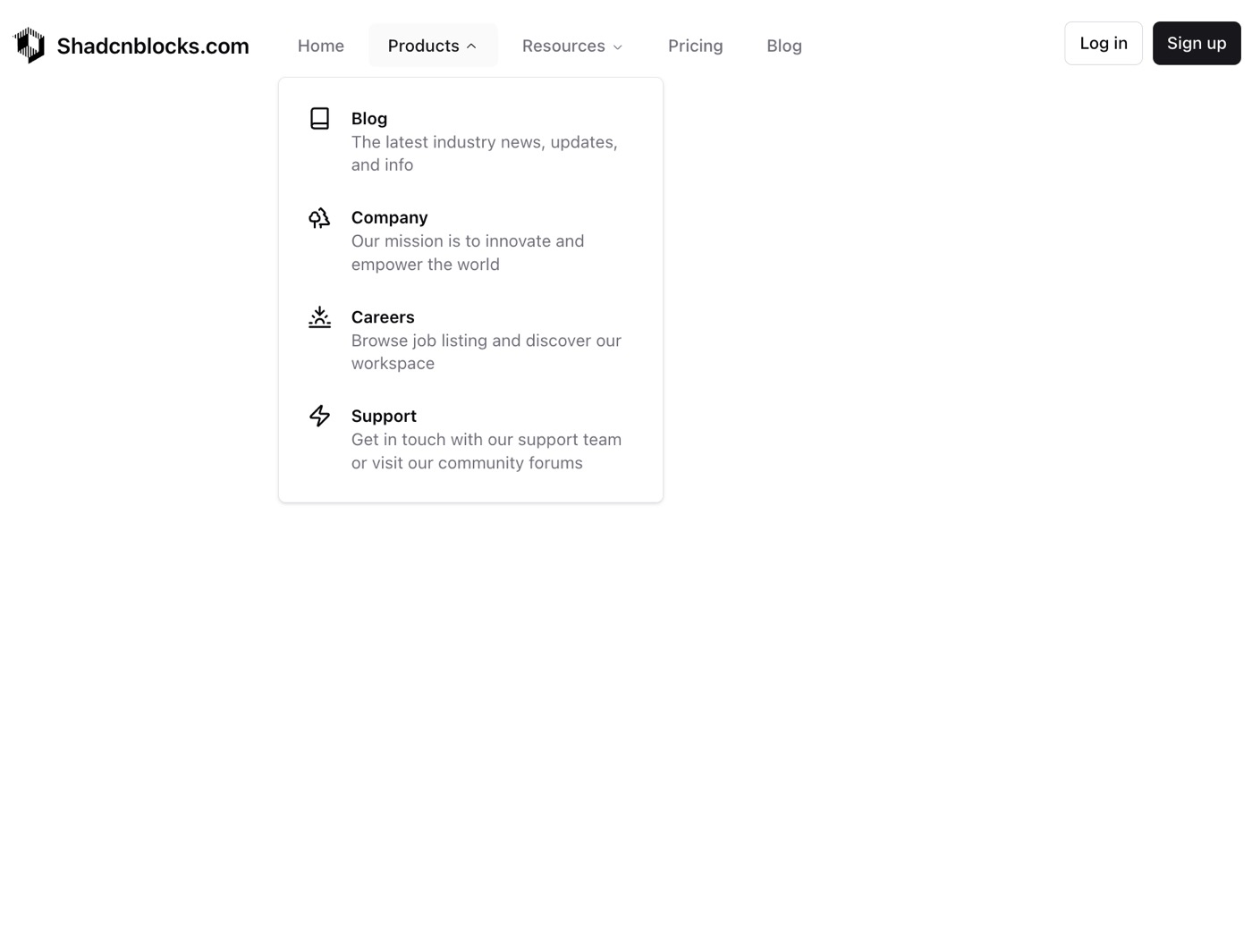
Navbar with Dropdowns

free · paste into Lovable, Bolt, v0, Cursor or Claude

Navbar with Dropdowns is a complete, paste-ready navigation build-prompt — a full art-direction spec for Lovable, Bolt, v0, Cursor and Claude. It's free: copy it below and paste it into your builder.

Navbar with Dropdowns preview

“A classic shadcn style navbar with dropdowns and mobile slide in menu. — Install — npx shadcn@latest add "https://21st.dev/r/shadcnblocks-com-navbar1" — Component source (Navbar with Dropdowns.tsx) — import { Book …”

Navbar with DropdownsNavigation · free prompt · copy-paste

Prompt page

A classic shadcn style navbar with dropdowns and mobile slide in menu.

— Install —
npx shadcn@latest add "https://21st.dev/r/shadcnblocks-com-navbar1"

— Component source (Navbar with Dropdowns.tsx) —

import { Book, Menu, Sunset, Trees, Zap } from "lucide-react";

import {
  Accordion,
  AccordionContent,
  AccordionItem,
  AccordionTrigger,
} from "@/components/ui/accordion";
import { Button } from "@/components/ui/button";
import {
  NavigationMenu,
  NavigationMenuContent,
  NavigationMenuItem,
  NavigationMenuLink,
  NavigationMenuList,
  NavigationMenuTrigger,
} from "@/components/ui/navigation-menu";
import {
  Sheet,
  SheetContent,
  SheetHeader,
  SheetTitle,
  SheetTrigger,
} from "@/components/ui/sheet";

interface MenuItem {
  title: string;
  url: string;
  description?: string;
  icon?: JSX.Element;
  items?: MenuItem[];
}

interface Navbar1Props {
  logo?: {
    url: string;
    src: string;
    alt: string;
    title: string;
  };
  menu?: MenuItem[];
  mobileExtraLinks?: {
    name: string;
    url: string;
  }[];
  auth?: {
    login: {
      text: string;
      url: string;
    };
    signup: {
      text: string;
      url: string;
    };
  };
}

const Navbar1 = ({
  logo = {
    url: "https://www.shadcnblocks.com",
    src: "https://www.shadcnblocks.com/images/block/block-1.svg",
    alt: "logo",
    title: "Shadcnblocks.com",
  },
  menu = [
    { title: "Home", url: "#" },
    {
      title: "Products",
      url: "#",
      items: [
        {
          title: "Blog",
          description: "The latest industry news, updates, and info",
          icon: <Book className="size-5 shrink-0" />,
          url: "#",
        },
        {
          title: "Company",
          description: "Our mission is to innovate and empower the world",
          icon: <Trees className="size-5 shrink-0" />,
          url: "#",
        },
        {
          title: "Careers",
          description: "Browse job listing and discover our workspace",
          icon: <Sunset className="size-5 shrink-0" />,
          url: "#",
        },
        {
          title: "Support",
          description:
            "Get in touch with our support team or visit our community forums",
          icon: <Zap className="size-5 shrink-0" />,
          url: "#",
        },
      ],
    },
    {
      title: "Resources",
      url: "#",
      items: [
        {
          title: "Help Center",
          description: "Get all the answers you need right here",
          icon: <Zap className="size-5 shrink-0" />,
          url: "#",
        },
        {
          title: "Contact Us",
          description: "We are here to help you with any questions you have",
          icon: <Sunset className="size-5 shrink-0" />,
          url: "#",
        },
        {
          title: "Status",
          description: "Check the current status of our services and APIs",
          icon: <Trees className="size-5 shrink-0" />,
          url: "#",
        },
        {
          title: "Terms of Service",
          description: "Our terms and conditions for using our services",
          icon: <Book className="size-5 shrink-0" />,
          url: "#",
        },
      ],
    },
    {
      title: "Pricing",
      url: "#",
    },
    {
      title: "Blog",
      url: "#",
    },
  ],
  mobileExtraLinks = [
    { name: "Press", url: "#" },
    { name: "Contact", url: "#" },
    { name: "Imprint", url: "#" },
    { name: "Sitemap", url: "#" },
  ],
  auth = {
    login: { text: "Log in", url: "#" },
    signup: { text: "Sign up", url: "#" },
  },
}: Navbar1Props) => {
  return (
    <section className="py-4">
      <div className="container">
        <nav className="hidden justify-between lg:flex">
          <div className="flex items-center gap-6">
            <a href={logo.url} className="flex items-center gap-2">
              <img src={logo.src} className="w-8" alt={logo.alt} />
              <span className="text-lg font-semibold">{logo.title}</span>
            </a>
            <div className="flex items-center">
              <NavigationMenu>
                <NavigationMenuList>
                  {menu.map((item) => renderMenuItem(item))}
                </NavigationMenuList>
              </NavigationMenu>
            </div>
          </div>
          <div className="flex gap-2">
            <Button asChild variant="outline" size="sm">
              <a href={auth.login.url}>{auth.login.text}</a>
            </Button>
            <Button asChild size="sm">
              <a href={auth.signup.url}>{auth.signup.text}</a>
            </Button>
          </div>
        </nav>
        <div className="block lg:hidden">
          <div className="flex items-center justify-between">
            <a href={logo.url} className="flex items-center gap-2">
              <img src={logo.src} className="w-8" alt={logo.alt} />
              <span className="text-lg font-semibold">{logo.title}</span>
            </a>
            <Sheet>
              <SheetTrigger asChild>
                <Button variant="outline" size="icon">
                  <Menu className="size-4" />
                </Button>
              </SheetTrigger>
              <SheetContent className="overflow-y-auto">
                <SheetHeader>
                  <SheetTitle>
                    <a href={logo.url} className="flex items-center gap-2">
                      <img src={logo.src} className="w-8" alt={logo.alt} />
                      <span className="text-lg font-semibold">
                        {logo.title}
                      </span>
                    </a>
                  </SheetTitle>
                </SheetHeader>
                <div className="my-6 flex flex-col gap-6">
                  <Accordion
                    type="single"
                    collapsible
                    className="flex w-full flex-col gap-4"
                  >
                    {menu.map((item) => renderMobileMenuItem(item))}
                  </Accordion>
                  <div className="border-t py-4">
                    <div className="grid grid-cols-2 justify-start">
                      {mobileExtraLinks.map((link, idx) => (
                        <a
                          key={idx}
                          className="inline-flex h-10 items-center gap-2 whitespace-nowrap rounded-md px-4 py-2 text-sm font-medium text-muted-foreground transition-colors hover:bg-muted hover:text-accent-foreground"
                          href={link.url}
                        >
                          {link.name}
                        </a>
                      ))}
                    </div>
                  </div>
                  <div className="flex flex-col gap-3">
                    <Button asChild variant="outline">
                      <a href={auth.login.url}>{auth.login.text}</a>
                    </Button>
                    <Button asChild>
                      <a href={auth.signup.url}>{auth.signup.text}</a>
                    </Button>
                  </div>
                </div>
              </SheetContent>
            </Sheet>
          </div>
        </div>
      </div>
    </section>
  );
};

const renderMenuItem = (item: MenuItem) => {
  if (item.items) {
    return (
      <NavigationMenuItem key={item.title} className="text-muted-foreground">
        <NavigationMenuTrigger>{item.title}</NavigationMenuTrigger>
        <NavigationMenuContent>
          <ul className="w-80 p-3">
            <NavigationMenuLink>
              {item.items.map((subItem) => (
                <li key={subItem.title}>
                  <a
                    className="flex select-none gap-4 rounded-md p-3 leading-none no-underline outline-none transition-colors hover:bg-muted hover:text-accent-foreground"
                    href={subItem.url}
                  >
                    {subItem.icon}
                    <div>
                      <div className="text-sm font-semibold">
                        {subItem.title}
                      </div>
                      {subItem.description && (
                        <p className="text-sm leading-snug text-muted-foreground">
                          {subItem.description}
                        </p>
                      )}
                    </div>
                  </a>
                </li>
              ))}
            </NavigationMenuLink>
          </ul>
        </NavigationMenuContent>
      </NavigationMenuItem>
    );
  }

  return (
    <a
      key={item.title}
      className="group inline-flex h-10 w-max items-center justify-center rounded-md bg-background px-4 py-2 text-sm font-medium text-muted-foreground transition-colors hover:bg-muted hover:text-accent-foreground"
      href={item.url}
    >
      {item.title}
    </a>
  );
};

const renderMobileMenuItem = (item: MenuItem) => {
  if (item.items) {
    return (
      <AccordionItem key={item.title} value={item.title} className="border-b-0">
        <AccordionTrigger className="py-0 font-semibold hover:no-underline">
          {item.title}
        </AccordionTrigger>
        <AccordionContent className="mt-2">
          {item.items.map((subItem) => (
            <a
              key={subItem.title}
              className="flex select-none gap-4 rounded-md p-3 leading-none outline-none transition-colors hover:bg-muted hover:text-accent-foreground"
              href={subItem.url}
            >
              {subItem.icon}
              <div>
                <div className="text-sm font-semibold">{subItem.title}</div>
                {subItem.description && (
                  <p className="text-sm leading-snug text-muted-foreground">
                    {subItem.description}
                  </p>
                )}
              </div>
            </a>
          ))}
        </AccordionContent>
      </AccordionItem>
    );
  }

  return (
    <a key={item.title} href={item.url} className="font-semibold">
      {item.title}
    </a>
  );
};

export { Navbar1 };

Browse & preview free → Unlock everything — from $19/mo

More like this

Sidebar — Navigation website build-promptSidebar Expandable Tabs — Navigation website build-promptExpandable Tabs Tubelight Navbar — Navigation website build-promptTubelight Navbar Dock — Navigation website build-promptDock Navbar Menu — Navigation website build-promptNavbar Menu Sidebar News — Navigation website build-promptSidebar News
Meez.

The biggest library of AI website build-prompts & motion backgrounds — at the lowest price.

Library
Browse all Prompts by category Section prompts Motion backgrounds Pricing
Learn & contact
How it works Why AI sites look generic Terms Privacy Contact Affiliates
© Meez — an open archive. Start free · Unlimited from $19/mo · cancel anytime.