Meez.
Browse Prompts Backgrounds Pricing
Contact Sign in ·

Component · Free prompt

Floating Panel

free · paste into Lovable, Bolt, v0, Cursor or Claude

Floating Panel is a complete, paste-ready component build-prompt — a full art-direction spec for Lovable, Bolt, v0, Cursor and Claude. It's free: copy it below and paste it into your builder.

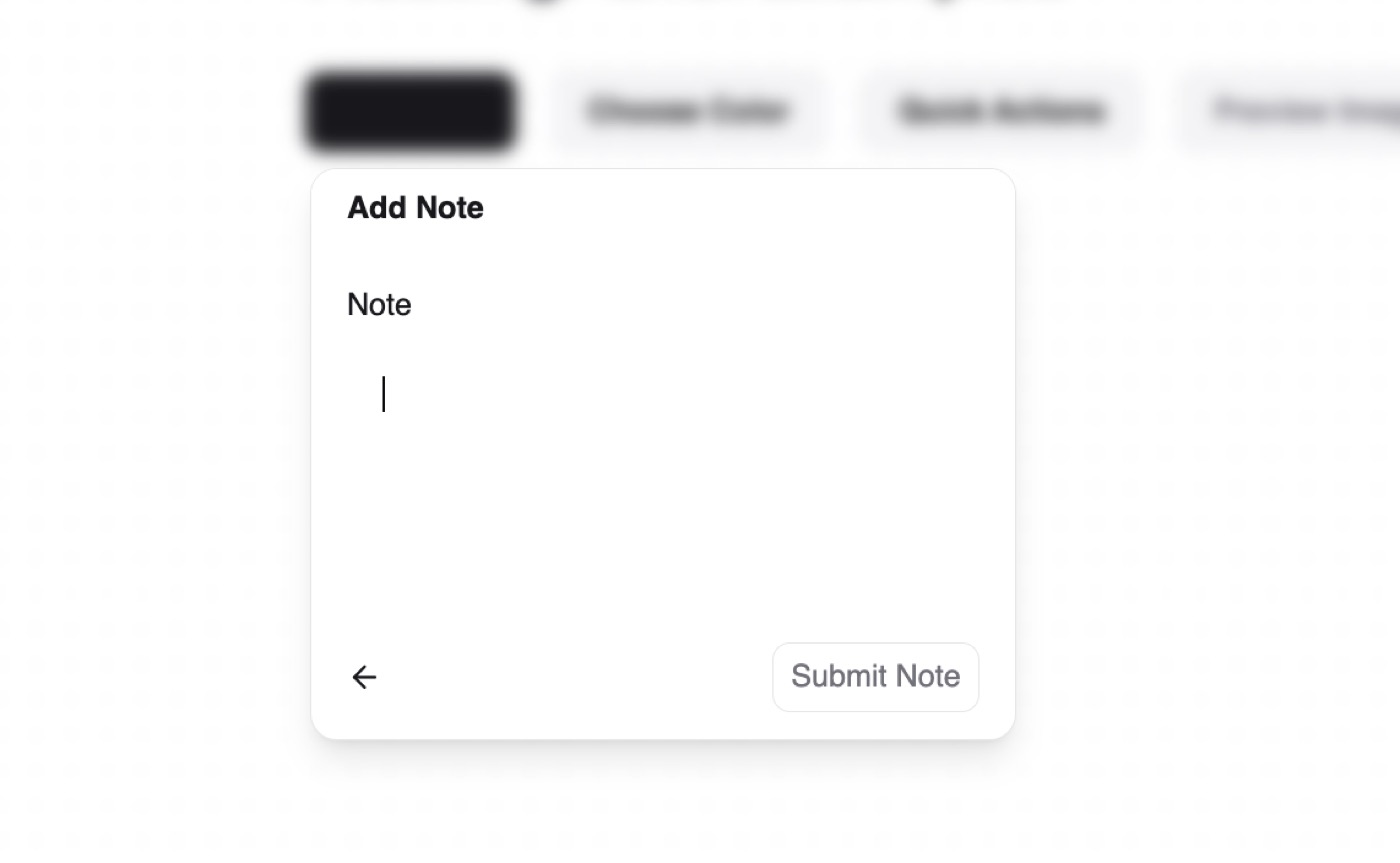
Floating Panel preview

“A headless, composable floating panel component — Install — npx shadcn@latest add "https://21st.dev/r/floating-panel" — Component source (Floating Panel.tsx) — "use client" import React, { createContext, useContext …”

Floating PanelComponent · free prompt · copy-paste

Prompt page

A headless, composable floating panel component

— Install —
npx shadcn@latest add "https://21st.dev/r/floating-panel"

— Component source (Floating Panel.tsx) —

"use client"

import React, {
  createContext,
  useContext,
  useEffect,
  useId,
  useRef,
  useState,
} from "react"
import { AnimatePresence, MotionConfig, Variants, motion } from "framer-motion"
import { ArrowLeftIcon } from "lucide-react"

import { cn } from "@/lib/utils"

const TRANSITION = {
  type: "spring",
  bounce: 0.1,
  duration: 0.4,
}

interface FloatingPanelContextType {
  isOpen: boolean
  openFloatingPanel: (rect: DOMRect) => void
  closeFloatingPanel: () => void
  uniqueId: string
  note: string
  setNote: (note: string) => void
  triggerRect: DOMRect | null
  title: string
  setTitle: (title: string) => void
}

const FloatingPanelContext = createContext<
  FloatingPanelContextType | undefined
>(undefined)

function useFloatingPanel() {
  const context = useContext(FloatingPanelContext)
  if (!context) {
    throw new Error(
      "useFloatingPanel must be used within a FloatingPanelProvider"
    )
  }
  return context
}

function useFloatingPanelLogic() {
  const uniqueId = useId()
  const [isOpen, setIsOpen] = useState(false)
  const [note, setNote] = useState("")
  const [triggerRect, setTriggerRect] = useState<DOMRect | null>(null)
  const [title, setTitle] = useState("")

  const openFloatingPanel = (rect: DOMRect) => {
    setTriggerRect(rect)
    setIsOpen(true)
  }
  const closeFloatingPanel = () => {
    setIsOpen(false)
    setNote("")
  }

  return {
    isOpen,
    openFloatingPanel,
    closeFloatingPanel,
    uniqueId,
    note,
    setNote,
    triggerRect,
    title,
    setTitle,
  }
}

interface FloatingPanelRootProps {
  children: React.ReactNode
  className?: string
}

export function FloatingPanelRoot({
  children,
  className,
}: FloatingPanelRootProps) {
  const floatingPanelLogic = useFloatingPanelLogic()

  return (
    <FloatingPanelContext.Provider value={floatingPanelLogic}>
      <MotionConfig transition={TRANSITION}>
        <div className={cn("relative", className)}>{children}</div>
      </MotionConfig>
    </FloatingPanelContext.Provider>
  )
}

interface FloatingPanelTriggerProps {
  children: React.ReactNode
  className?: string
  title: string
}

export function FloatingPanelTrigger({
  children,
  className,
  title,
}: FloatingPanelTriggerProps) {
  const { openFloatingPanel, uniqueId, setTitle } = useFloatingPanel()
  const triggerRef = useRef<HTMLButtonElement>(null)

  const handleClick = () => {
    if (triggerRef.current) {
      openFloatingPanel(triggerRef.current.getBoundingClientRect())
      setTitle(title)
    }
  }

  return (
    <motion.button
      ref={triggerRef}
      layoutId={`floating-panel-trigger-${uniqueId}`}
      className={cn(
        "flex h-9 items-center border border-zinc-950/10 bg-white px-3 text-zinc-950 dark:border-zinc-50/10 dark:bg-zinc-700 dark:text-zinc-50",
        className
      )}
      style={{ borderRadius: 8 }}
      onClick={handleClick}
      whileHover={{ scale: 1.05 }}
      whileTap={{ scale: 0.95 }}
      aria-haspopup="dialog"
      aria-expanded={false}
    >
      <motion.div
        layoutId={`floating-panel-label-container-${uniqueId}`}
        className="flex items-center"
      >
        <motion.span
          layoutId={`floating-panel-label-${uniqueId}`}
          className="text-sm font-semibold"
        >
          {children}
        </motion.span>
      </motion.div>
    </motion.button>
  )
}

interface FloatingPanelContentProps {
  children: React.ReactNode
  className?: string
}

export function FloatingPanelContent({
  children,
  className,
}: FloatingPanelContentProps) {
  const { isOpen, closeFloatingPanel, uniqueId, triggerRect, title } =
    useFloatingPanel()
  const contentRef = useRef<HTMLDivElement>(null)

  useEffect(() => {
    const handleClickOutside = (event: MouseEvent) => {
      if (
        contentRef.current &&
        !contentRef.current.contains(event.target as Node)
      ) {
        closeFloatingPanel()
      }
    }
    document.addEventListener("mousedown", handleClickOutside)
    return () => document.removeEventListener("mousedown", handleClickOutside)
  }, [closeFloatingPanel])

  useEffect(() => {
    const handleKeyDown = (event: KeyboardEvent) => {
      if (event.key === "Escape") closeFloatingPanel()
    }
    document.addEventListener("keydown", handleKeyDown)
    return () => document.removeEventListener("keydown", handleKeyDown)
  }, [closeFloatingPanel])

  const variants: Variants = {
    hidden: { opacity: 0, scale: 0.9, y: 10 },
    visible: { opacity: 1, scale: 1, y: 0 },
  }

  return (
    <AnimatePresence>
      {isOpen && (
        <>
          <motion.div
            initial={{ backdropFilter: "blur(0px)" }}
            animate={{ backdropFilter: "blur(4px)" }}
            exit={{ backdropFilter: "blur(0px)" }}
            className="fixed inset-0 z-40"
          />
          <motion.div
            ref={contentRef}
            layoutId={`floating-panel-${uniqueId}`}
            className={cn(
              "fixed z-50 overflow-hidden border border-zinc-950/10 bg-white shadow-lg outline-none dark:border-zinc-50/10 dark:bg-zinc-800",
              className
            )}
            style={{
              borderRadius: 12,
              left: triggerRect ? triggerRect.left : "50%",
              top: triggerRect ? triggerRect.bottom + 8 : "50%",
              transformOrigin: "top left",
            }}
            initial="hidden"
            animate="visible"
            exit="hidden"
            variants={variants}
            role="dialog"
            aria-modal="true"
            aria-labelledby={`floating-panel-title-${uniqueId}`}
          >
            <FloatingPanelTitle>{title}</FloatingPanelTitle>
            {children}
          </motion.div>
        </>
      )}
    </AnimatePresence>
  )
}

interface FloatingPanelTitleProps {
  children: React.ReactNode
}

function FloatingPanelTitle({ children }: FloatingPanelTitleProps) {
  const { uniqueId } = useFloatingPanel()

  return (
    <motion.div
      layoutId={`floating-panel-label-container-${uniqueId}`}
      className="px-4 py-2 bg-white dark:bg-zinc-800"
    >
      <motion.div
        layoutId={`floating-panel-label-${uniqueId}`}
        className="text-sm font-semibold text-zinc-900 dark:text-zinc-100"
        id={`floating-panel-title-${uniqueId}`}
      >
        {children}
      </motion.div>
    </motion.div>
  )
}

interface FloatingPanelFormProps {
  children: React.ReactNode
  onSubmit?: (note: string) => void
  className?: string
}

export function FloatingPanelForm({
  children,
  onSubmit,
  className,
}: FloatingPanelFormProps) {
  const { note, closeFloatingPanel } = useFloatingPanel()

  const handleSubmit = (e: React.FormEvent) => {
    e.preventDefault()
    onSubmit?.(note)
    closeFloatingPanel()
  }

  return (
    <form
      className={cn("flex h-full flex-col", className)}
      onSubmit={handleSubmit}
    >
      {children}
    </form>
  )
}

interface FloatingPanelLabelProps {
  children: React.ReactNode
  htmlFor: string
  className?: string
}

export function FloatingPanelLabel({
  children,
  htmlFor,
  className,
}: FloatingPanelLabelProps) {
  const { note } = useFloatingPanel()

  return (
    <motion.label
      htmlFor={htmlFor}
      style={{ opacity: note ? 0 : 1 }}
      className={cn(
        "block mb-2 text-sm font-medium text-zinc-900 dark:text-zinc-100",
        className
      )}
    >
      {children}
    </motion.label>
  )
}

interface FloatingPanelTextareaProps {
  className?: string
  id?: string
}

export function FloatingPanelTextarea({
  className,
  id,
}: FloatingPanelTextareaProps) {
  const { note, setNote } = useFloatingPanel()

  return (
    <textarea
      id={id}
      className={cn(
        "h-full w-full resize-none rounded-md bg-transparent px-4 py-3 text-sm outline-none",
        className
      )}
      autoFocus
      value={note}
      onChange={(e) => setNote(e.target.value)}
    />
  )
}

interface FloatingPanelHeaderProps {
  children: React.ReactNode
  className?: string
}

export function FloatingPanelHeader({
  children,
  className,
}: FloatingPanelHeaderProps) {
  return (
    <motion.div
      className={cn(
        "px-4 py-2 font-semibold text-zinc-900 dark:text-zinc-100",
        className
      )}
      initial={{ opacity: 0, y: -10 }}
      animate={{ opacity: 1, y: 0 }}
      transition={{ delay: 0.1 }}
    >
      {children}
    </motion.div>
  )
}

interface FloatingPanelBodyProps {
  children: React.ReactNode
  className?: string
}

export function FloatingPanelBody({
  children,
  className,
}: FloatingPanelBodyProps) {
  return (
    <motion.div
      className={cn("p-4", className)}
      initial={{ opacity: 0, y: 10 }}
      animate={{ opacity: 1, y: 0 }}
      transition={{ delay: 0.2 }}
    >
      {children}
    </motion.div>
  )
}

interface FloatingPanelFooterProps {
  children: React.ReactNode
  className?: string
}

export function FloatingPanelFooter({
  children,
  className,
}: FloatingPanelFooterProps) {
  return (
    <motion.div
      className={cn("flex justify-between px-4 py-3", className)}
      initial={{ opacity: 0, y: 10 }}
      animate={{ opacity: 1, y: 0 }}
      transition={{ delay: 0.3 }}
    >
      {children}
    </motion.div>
  )
}

interface FloatingPanelCloseButtonProps {
  className?: string
}

export function FloatingPanelCloseButton({
  className,
}: FloatingPanelCloseButtonProps) {
  const { closeFloatingPanel } = useFloatingPanel()

  return (
    <motion.button
      type="button"
      className={cn("flex items-center", className)}
      onClick={closeFloatingPanel}
      aria-label="Close floating panel"
      whileHover={{ scale: 1.1 }}
      whileTap={{ scale: 0.9 }}
    >
      <ArrowLeftIcon size={16} className="text-zinc-900 dark:text-zinc-100" />
    </motion.button>
  )
}

interface FloatingPanelSubmitButtonProps {
  className?: string
}

export function FloatingPanelSubmitButton({
  className,
}: FloatingPanelSubmitButtonProps) {
  return (
    <motion.button
      className={cn(
        "relative ml-1 flex h-8 shrink-0 scale-100 select-none appearance-none items-center justify-center rounded-lg border border-zinc-950/10 bg-transparent px-2 text-sm text-zinc-500 transition-colors hover:bg-zinc-100 hover:text-zinc-800 focus-visible:ring-2 active:scale-[0.98] dark:border-zinc-50/10 dark:text-zinc-50 dark:hover:bg-zinc-800",
        className
      )}
      type="submit"
      aria-label="Submit note"
      whileHover={{ scale: 1.05 }}
      whileTap={{ scale: 0.95 }}
    >
      Submit Note
    </motion.button>
  )
}

interface FloatingPanelButtonProps {
  children: React.ReactNode
  onClick?: () => void
  className?: string
}

export function FloatingPanelButton({
  children,
  onClick,
  className,
}: FloatingPanelButtonProps) {
  return (
    <motion.button
      className={cn(
        "flex w-full items-center gap-2 rounded-md px-4 py-2 text-left text-sm hover:bg-zinc-100 dark:hover:bg-zinc-700",
        className
      )}
      onClick={onClick}
      whileHover={{ backgroundColor: "rgba(0, 0, 0, 0.05)" }}
      whileTap={{ scale: 0.98 }}
    >
      {children}
    </motion.button>
  )
}

export {
  FloatingPanelRoot as Root,
  FloatingPanelTrigger as Trigger,
  FloatingPanelContent as Content,
  FloatingPanelForm as Form,
  FloatingPanelLabel as Label,
  FloatingPanelTextarea as Textarea,
  FloatingPanelHeader as Header,
  FloatingPanelBody as Body,
  FloatingPanelFooter as Footer,
  FloatingPanelCloseButton as CloseButton,
  FloatingPanelSubmitButton as SubmitButton,
  FloatingPanelButton as Button,
}

Browse & preview free → Unlock everything — from $19/mo

More like this

Animated Cards — Component website build-promptAnimated Cards Table — Component website build-promptTable Empty State — Component website build-promptEmpty State Feature Section with hover effects — Component website build-promptFeature Section with hover effects Lamp — Component website build-promptLamp World Map — Component website build-promptWorld Map
Meez.

The biggest library of AI website build-prompts & motion backgrounds — at the lowest price.

Library
Browse all Prompts by category Section prompts Motion backgrounds Pricing
Learn & contact
How it works Why AI sites look generic Terms Privacy Contact Affiliates
© Meez — an open archive. Start free · Unlimited from $19/mo · cancel anytime.