Form · Free prompt
AI Input With Search
AI Input With Search is a complete, paste-ready form build-prompt — a full art-direction spec for Lovable, Bolt, v0, Cursor and Claude. It's free: copy it below and paste it into your builder.

AI Input With SearchForm · free prompt · copy-paste
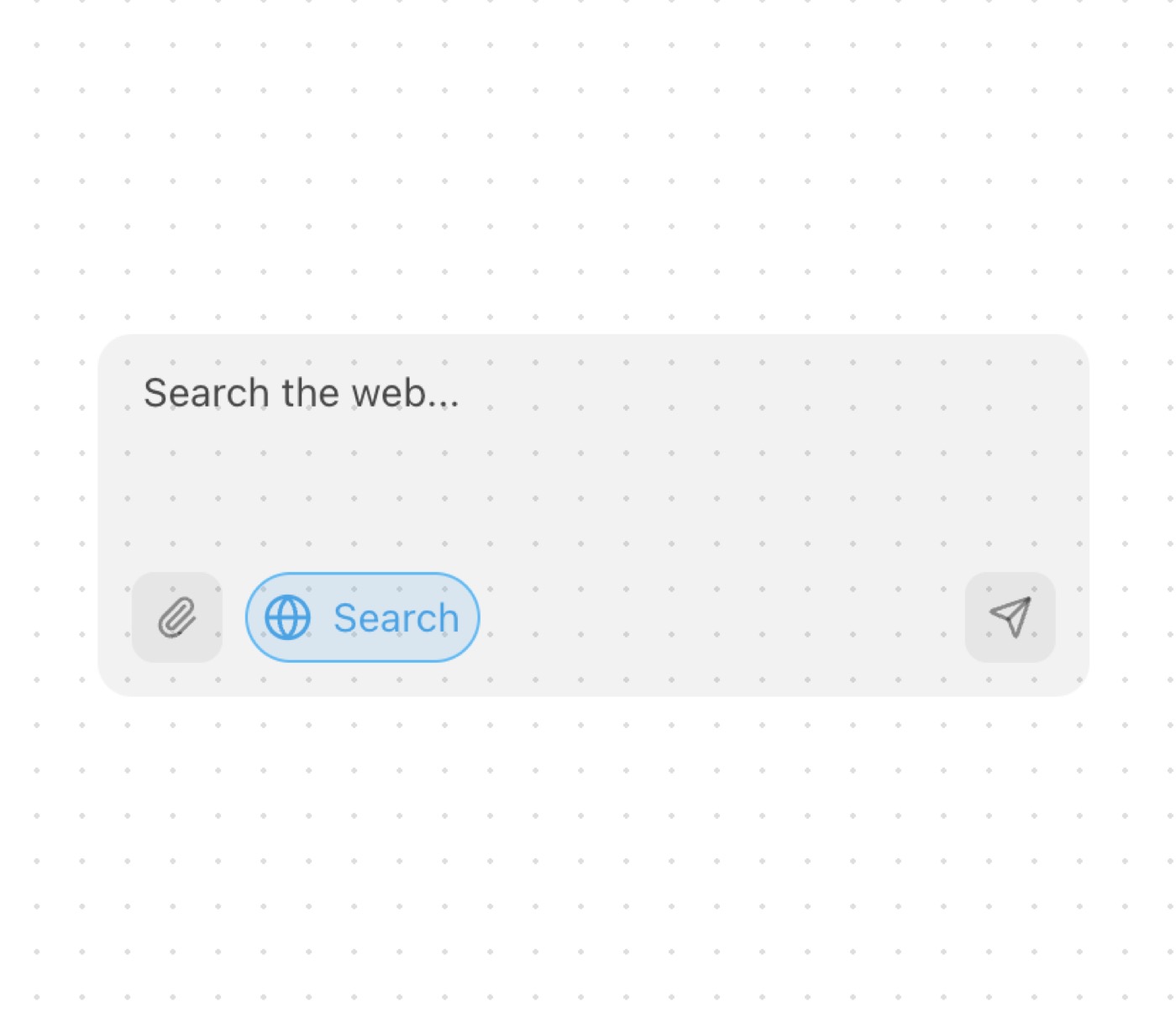
A modern chat input component with a web search toggle and file upload functionality. This component features an animated search toggle, file attachment support, and smooth transitions.
Features:
• Animated search toggle button
• File upload support
• Auto-resizing textarea
• Dark mode compatibility
• Keyboard shortcuts
• Framer Motion animations for enhanced user experience
• Mobile responsiveness
— Install —
npx shadcn@latest add "https://21st.dev/r/ai-input-with-search"
— Component source (AI Input With Search.tsx) —
"use client";
import { Globe, Paperclip, Send } from "lucide-react";
import { useState } from "react";
import { Textarea } from "@/components/ui/textarea";
import { motion, AnimatePresence } from "framer-motion";
import { cn } from "@/lib/utils";
import { useAutoResizeTextarea } from "@/components/hooks/use-auto-resize-textarea";
interface AIInputWithSearchProps {
id?: string;
placeholder?: string;
minHeight?: number;
maxHeight?: number;
onSubmit?: (value: string, withSearch: boolean) => void;
onFileSelect?: (file: File) => void;
className?: string;
}
export function AIInputWithSearch({
id = "ai-input-with-search",
placeholder = "Search the web...",
minHeight = 48,
maxHeight = 164,
onSubmit,
onFileSelect,
className
}: AIInputWithSearchProps) {
const [value, setValue] = useState("");
const { textareaRef, adjustHeight } = useAutoResizeTextarea({
minHeight,
maxHeight,
});
const [showSearch, setShowSearch] = useState(true);
const handleSubmit = () => {
if (value.trim()) {
onSubmit?.(value, showSearch);
setValue("");
adjustHeight(true);
}
};
const handleFileChange = (e: React.ChangeEvent<HTMLInputElement>) => {
const file = e.target.files?.[0];
if (file) {
onFileSelect?.(file);
}
};
return (
<div className={cn("w-full py-4", className)}>
<div className="relative max-w-xl w-full mx-auto">
<div className="relative flex flex-col">
<div
className="overflow-y-auto"
style={{ maxHeight: `${maxHeight}px` }}
>
<Textarea
id={id}
value={value}
placeholder={placeholder}
className="w-full rounded-xl rounded-b-none px-4 py-3 bg-black/5 dark:bg-white/5 border-none dark:text-white placeholder:text-black/70 dark:placeholder:text-white/70 resize-none focus-visible:ring-0 leading-[1.2]"
ref={textareaRef}
onKeyDown={(e) => {
if (e.key === "Enter" && !e.shiftKey) {
e.preventDefault();
handleSubmit();
}
}}
onChange={(e) => {
setValue(e.target.value);
adjustHeight();
}}
/>
</div>
<div className="h-12 bg-black/5 dark:bg-white/5 rounded-b-xl">
<div className="absolute left-3 bottom-3 flex items-center gap-2">
<label className="cursor-pointer rounded-lg p-2 bg-black/5 dark:bg-white/5">
<input
type="file"
className="hidden"
onChange={handleFileChange}
/>
<Paperclip className="w-4 h-4 text-black/40 dark:text-white/40 hover:text-black dark:hover:text-white transition-colors" />
</label>
<button
type="button"
onClick={() => setShowSearch(!showSearch)}
className={cn(
"rounded-full transition-all flex items-center gap-2 px-1.5 py-1 border h-8",
showSearch
? "bg-sky-500/15 border-sky-400 text-sky-500"
: "bg-black/5 dark:bg-white/5 border-transparent text-black/40 dark:text-white/40 hover:text-black dark:hover:text-white"
)}
>
<div className="w-4 h-4 flex items-center justify-center flex-shrink-0">
<motion.div
animate={{
rotate: showSearch ? 180 : 0,
scale: showSearch ? 1.1 : 1,
}}
whileHover={{
rotate: showSearch ? 180 : 15,
scale: 1.1,
transition: {
type: "spring",
stiffness: 300,
damping: 10,
},
}}
transition={{
type: "spring",
stiffness: 260,
damping: 25,
}}
>
<Globe
className={cn(
"w-4 h-4",
showSearch
? "text-sky-500"
: "text-inherit"
)}
/>
</motion.div>
</div>
<AnimatePresence>
{showSearch && (
<motion.span
initial={{ width: 0, opacity: 0 }}
animate={{
width: "auto",
opacity: 1,
}}
exit={{ width: 0, opacity: 0 }}
transition={{ duration: 0.2 }}
className="text-sm overflow-hidden whitespace-nowrap text-sky-500 flex-shrink-0"
>
Search
</motion.span>
)}
</AnimatePresence>
</button>
</div>
<div className="absolute right-3 bottom-3">
<button
type="button"
onClick={handleSubmit}
className={cn(
"rounded-lg p-2 transition-colors",
value
? "bg-sky-500/15 text-sky-500"
: "bg-black/5 dark:bg-white/5 text-black/40 dark:text-white/40 hover:text-black dark:hover:text-white"
)}
>
<Send className="w-4 h-4" />
</button>
</div>
</div>
</div>
</div>
</div>
);
}
Browse & preview free Unlock everything — from $19/mo